
Badseed Tech Carpio: The Honest Guide to DeltaHub’s Gliding Wrist Rest
Quick answer: The Badseed Tech Carpio is a limited-edition colourway of DeltaHub’s Carpio 2.0, a small gliding wrist rest that sits under the heel of your palm and moves with your mouse hand. It is the same Carpio 2.0 mechanism, shell and materials as the standard version — only the colour, the blue silicone pads and the branding are different. If you spend long hours with a mouse and your wrist aches from dragging across a desk, it is a well-made, genuinely useful desk accessory. It is not a medical device, it will not cure wrist pain, and it will not make you a better gamer. This guide separates what is verified from what the company claims, walks you through sizing and setup, and tells you who should buy it and who should skip it.
At a Glance
| Detail | What you need to know |
|---|---|
| Product | Carpio 2.0 – BadSeed Tech Edition, a gliding ergonomic wrist rest |
| Maker | DeltaHub, an ergonomics company based in Celje, Slovenia |
| What changes vs standard Carpio 2.0 | Colour, blue “BadSeed Tech Blue” pads and branding only — same mechanism and materials |
| Sizes | Small 8.4 × 3.6 cm; Large 9.6 × 4.0 cm |
| Reported weight | About 17 g (small), about 22 g (large) |
| Reported launch price | $34.90 for a single; a left-plus-right pair about $59.80–$59.90 |
| Best for | Long mouse sessions, office work, editing, and most gaming — except heavy mouse-lift FPS play |
| Not a | Medical device, a treatment for wrist pain, or a performance upgrade |
What Is the Badseed Tech Carpio?
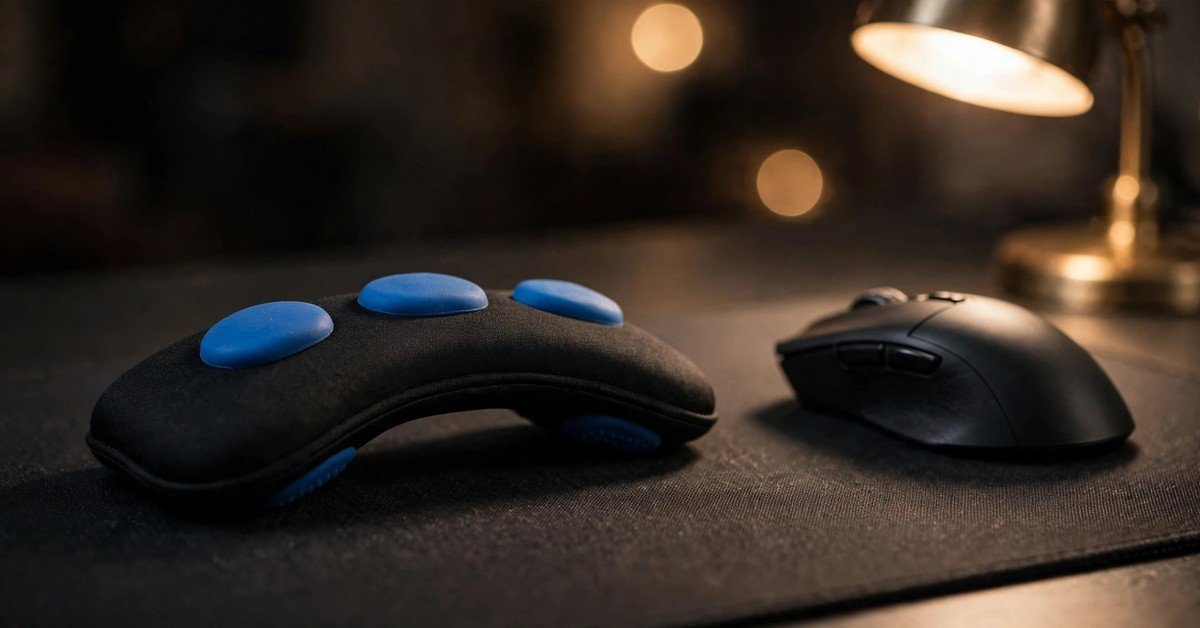
The Badseed Tech Carpio is a small, curved rest that supports the heel of your palm while you use a computer mouse. Unlike a gel wrist rest that stays fixed to your desk, the Carpio glides. It has smooth PTFE feet on its underside, so the whole rest travels with your hand as your mouse moves. The idea is simple: your wrist stays supported through the full range of mouse movement instead of only when your hand happens to be parked over a static pad.
It is the Carpio 2.0 – BadSeed Tech Edition, made in collaboration with the BadSeed Tech YouTube channel, run by Brian Phillips. BadSeed Tech is known for hands-on hardware videos under the tagline “TECH VIDEOS. ALL KILLER. NO FILLER.” The channel’s audience is the same crowd DeltaHub was already selling to: people who build their own PCs, care about their desks, and spend long evenings at a keyboard and mouse. A creator edition, in other words, is a meeting of two audiences that already overlap.
It helps to be precise about what this product is, because the name invites confusion. It is not software. It is not a platform, a service, or a new ergonomic system. It is a physical desk accessory: an ABS plastic shell, silicone pads you can replace, and PTFE gliders underneath. It does one job, and the rest of this guide is about whether that job is worth about thirty-five dollars to you.
DeltaHub is not a newcomer to this space. Its homepage currently lists the Carpio 2.0, the Carpio G2.0, a Linus Tech Tips creator edition, desk mats, a glass feet base and a range of Carpio Mods, and the Carpio has won a BigSEE Design Award, a Product Hunt Golden Kitty Award, and the Slovenian Chamber of Commerce’s Highest Award for Innovation along with its Special Award for Startups. Awards do not prove a product will suit your hand, but they mark this as a serious, established product line rather than a crowdfunding experiment.
What’s in the Box — and What It Costs
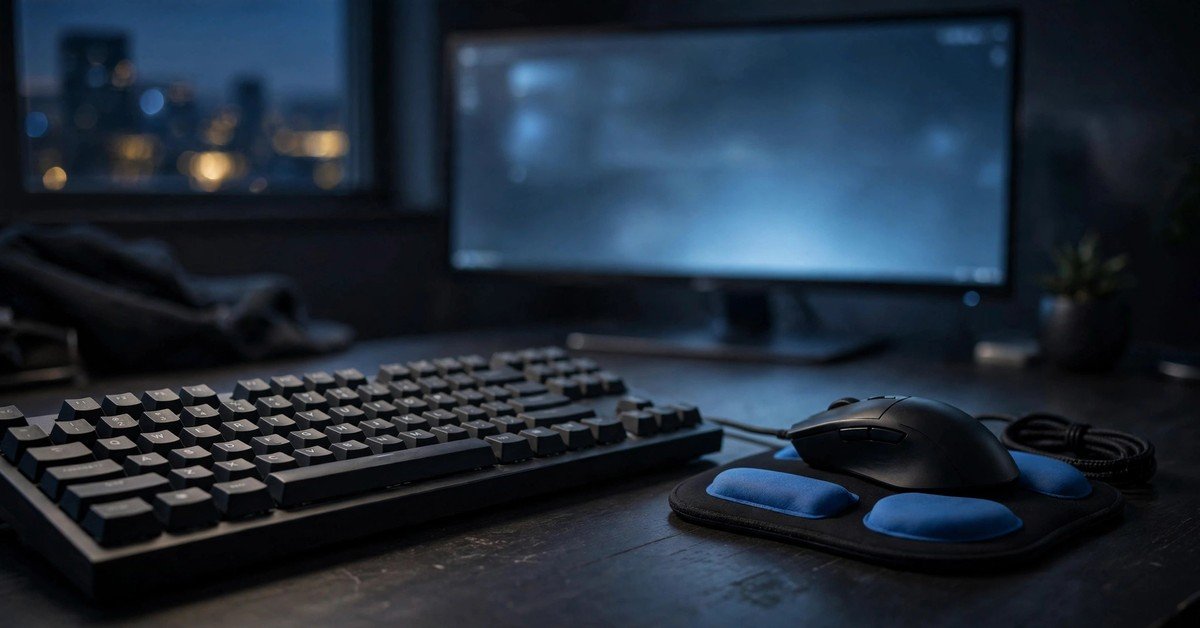
The box holds a black Carpio 2.0 body, a set of standard silicone pads, and a second set of replaceable BadSeed Tech Special Edition pads in the edition’s signature blue, officially labelled “BadSeed Tech Blue”. You buy it for your left hand, your right hand, or both. The pair option covers people who mouse with one hand and want support on the other side too, or households where two people share a desk.
The launch price was reported at $34.90 for a single rest. A left-plus-right pair was reported at about $59.80 to $59.90, which works out to roughly 15 percent less than buying two singles. For comparison, the Carpio G2.0 — the strapped gaming variant, which is a different product and not this edition — starts from about $39.90. Treat every figure in this section as a snapshot taken on 15 November 2026. Prices and stock change, editions sell out, and limited runs do exactly what the name promises. Check the official DeltaHub store for the current price and availability before you buy.
The announcement of this edition was reported on 12 December 2025, from a single fan-run source, so treat the date as reported rather than settled fact. What is confirmed is that the edition exists, is sold through DeltaHub, and follows the pattern of DeltaHub’s other creator editions — the Linus Tech Tips edition of August 2024, and editions for the creators Liv and Cozy K.
Before you spend anything, one honest check matters more than the price: measure your hand. A wrist rest that is the wrong size is worse than no wrist rest at all, because it puts your palm in a position your body has to fight all day. The sizing walkthrough later in this guide takes about a minute and needs nothing more than a credit card.
BadSeed Edition vs Standard Carpio 2.0: What’s Actually Different?
Short version: almost nothing functional. The BadSeed edition uses the identical Carpio 2.0 shell, PTFE gliders and mechanism. What changes is the look: a black body, blue silicone pads, and BadSeed Tech branding. That is the single most important fact in this guide, because it answers the question most buyers actually have: does the special edition work better than the standard one? It does not. It works the same. You are choosing a colourway and a creator you want to support, not a better wrist rest.
That is not a criticism. Creator editions exist so that a community can buy the thing it already likes in the colours of the channel it watches, and so the creator gets a share of the result. The Linus Tech Tips edition works the same way, and nobody pretends it glides faster. What matters is that you go in with your eyes open: if the standard Carpio 2.0 is in stock and cheaper, it will do the same job for your wrist.
The table below lays out the comparison plainly, so there is no room for a reseller or a review to blur it later.
| Feature | Carpio 2.0 (standard) | BadSeed Tech Edition |
|---|---|---|
| Shell and mechanism | ABS shell, PTFE gliders | Identical |
| Silicone pads | Standard pads, replaceable | Standard pads plus blue Special Edition pads |
| Colour | Standard colours | Black body, “BadSeed Tech Blue” pads |
| Branding | DeltaHub | BadSeed Tech |
| Sizes | Small and Large | Small and Large |
| Left / right / both | Yes | Yes |
| Performance | Baseline | Same as standard — no measured difference |
There is one more distinction worth making, because it trips people up. The Carpio G2.0 is not the BadSeed edition, and the BadSeed edition is not a G2.0. The G2.0 is a separate, strapped gaming variant that came out of feedback from BadSeed Tech’s own testing — specifically, that fast FPS play with frequent mouse lifts is a weak spot for a free-gliding rest. The strap keeps the rest attached to your hand when you lift and reposition the mouse. If your main use is competitive FPS gaming, the G2.0 deserves a look alongside this edition, and the alternatives section later in this guide compares them directly.
How It Works: Glide, Pads, and PTFE Feet
Your palm has a thick, padded area at its base, on the thumb side and the little-finger side. When you rest that area — the heel of the palm — on a support, your wrist can stay in a more neutral position instead of bending back or pressing down onto the desk. The Carpio is shaped to sit under exactly that part of the hand. The shell is a low, curved cradle; the silicone pads on top are where your skin makes contact; the PTFE gliders underneath are what let the whole thing slide.
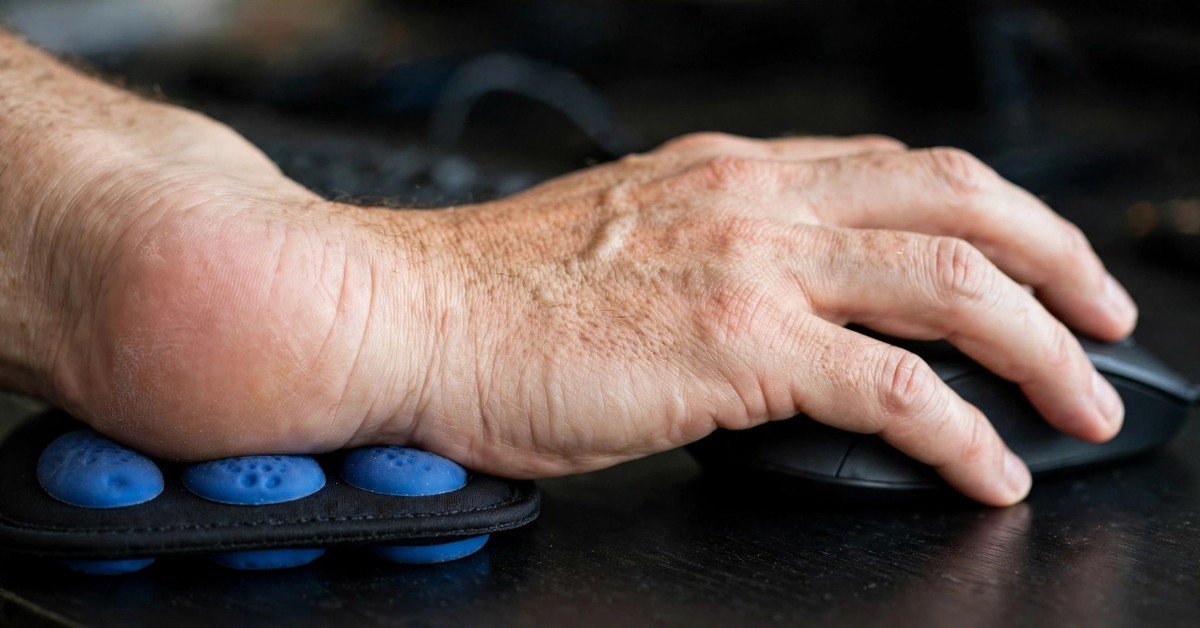
PTFE is the same slippery plastic used on the feet of good gaming mice, and the principle is identical: reduce friction between the moving part and the desk so small movements feel smooth rather than sticky. The surface under the rest matters a great deal here. DeltaHub recommends a neoprene or felt desk mat, and that advice is worth following. On a glossy desk or a rough wooden surface, the glide gets worse — either too slick and uncontrolled, or scratchy and uneven. A desk mat gives the PTFE feet a consistent surface to work on, and it also protects your desk from the rest itself.
The pads deserve a second look, because they are the part of the product you will actually feel. They are made of silicone, they sit on top of the shell, and they are replaceable. Sweat, skin oils and daily use wear any soft contact surface down over time, so being able to swap pads rather than replace the whole rest is a genuine long-term advantage. The BadSeed edition ships with two sets — standard and blue — so you have a spare from day one. DeltaHub also sells replacement pads separately.
One design detail explains most of the love-it-or-hate-it reactions you will read online: the rest is deliberately small. It supports the heel of your palm and nothing else. Your fingers, your knuckles and the front of your palm stay free, and your wrist itself floats above the desk rather than resting on anything. That is the point. A support that props up your wrist from below can push it into extension — bent backwards — which is the position ergonomists generally want you to avoid. By supporting the palm heel and leaving the wrist free, the Carpio aims for a neutral wrist. But the small footprint is also why the adjustment period exists: your hand has to learn a new resting position, and that takes days, not minutes.
Specs and Sizes
Everything below comes from DeltaHub’s published specifications and the review coverage that agrees with them. The weight figures carry a caveat: they come from a single review source, so treat them as reported rather than manufacturer-confirmed.
| Specification | Small | Large |
|---|---|---|
| Dimensions | 8.4 × 3.6 cm (3.3 × 1.4 in) | 9.6 × 4.0 cm (3.8 × 1.6 in) |
| Reported weight | About 17 g | About 22 g |
| Shell material | ABS plastic | ABS plastic |
| Contact pads | Silicone, replaceable | Silicone, replaceable |
| Gliders | PTFE feet | PTFE feet |
| Hands | Left or right | Left or right |
| Edition extras | Blue Special Edition pads included | Blue Special Edition pads included |
Two things stand out in that table. First, the size difference between Small and Large is small on paper — about a centimetre in length — but large in practice, because the rest has to match the width of your palm heel. Second, the weight is almost nothing: 17 to 22 grams is lighter than most mice. You will not feel the rest as a weight; you will feel it, if anything, as a presence under your palm, which is why the first week matters. Numbers only help if you know which ones matter — the same way Jeannine‘s story turns on small, easily missed details.
DeltaHub also sells the Carpio in a left-hand version, which is worth a mention because left-handed mouse users are routinely ignored by ergonomic accessories. The shape is mirrored rather than simply flipped, so a left-handed buyer gets a rest shaped for a left palm rather than a right-handed rest turned around. If you mouse with your left hand, order the left version explicitly — do not assume a “both hands” pair contains two identical pieces.
How to Pick the Right Size
DeltaHub’s sizing method is refreshingly low-tech: compare your palm to a credit card. Take a standard bank card and hold it across the heel of your palm — the fleshy area at the base, below your thumb and little finger. If the width of your palm heel is close to the card’s width or narrower, the Small is the right starting point. If your palm heel is clearly wider than the card, go Large. That is the whole method, and it works because the rest only needs to support that one area. It does not need to match your hand length, your finger length, or your grip style.
Two practical rules sit on top of the card test. First, if you are between sizes, most long-term users suggest sizing up rather than down: a rest that is slightly too large still supports your palm, while a rest that is too small leaves part of your palm heel hanging off the edge, which defeats the purpose. Second, think about how you hold your mouse. Palm-grip users, whose whole hand rests on the mouse, tend to want the larger rest. Claw and fingertip grippers, who hold the mouse with arched fingers and a raised palm, often find the Small is enough because less of their palm is in contact with anything.
Left-handed users should run the same test on their mousing hand, not their dominant hand if those differ. Plenty of left-handed people mouse with their right hand because that is how every shared computer they ever used was set up, and the rest needs to fit the hand that actually holds the mouse. If you are buying a pair, size each hand separately. Hands are rarely symmetrical, and it is entirely normal for one hand to need a Small and the other a Large.
One more thing before you order: check the return policy of wherever you buy it from. A credit-card test gets you close, but the only real test is a week of actual use, and a seller that accepts returns takes the risk out of that experiment.
Your First 7 Days: The Adjustment Plan
Almost every honest review of the Carpio mentions the same thing: the first few days feel strange. Your hand has spent years resting on a desk or a gel pad, and a small gliding cradle under your palm heel is a new habit, not a plug-and-play upgrade. Plan for a week, not an afternoon. The day-by-day plan below is a realistic shape for that week, drawn from how reviewers and long-term users describe the process.
Day 1 — setup. Put the rest on a desk mat, not a bare desk. Place it so the heel of your palm sits on the pads with your fingers reaching the mouse naturally. Do not force your hand into a new grip. If your wrist feels bent or your fingers cannot reach the mouse buttons comfortably, slide the rest forward or back until the position feels neutral. Use it for short sessions of an hour or two, then take it away and work normally for the rest of the day.
Day 2 — short sessions. Use the rest for half your computer time. Most people report that the glide feels too free at first, as if the rest is running away from their hand. That is normal: your muscles are used to friction holding your hand in place. Keep sessions short.
Day 3 — the awkward peak. This is usually the worst day: the novelty has worn off, the oddness has not, and most people who give up do so now. Push through if you can, using the rest for most of the day, but take breaks whenever your hand feels tired rather than supported.
Day 4 — the turn. For many users this is when the glide starts to feel natural. Your hand stops fighting the movement, and the rest starts to feel like part of the mouse rather than a separate object. If it still feels actively uncomfortable — not merely unfamiliar, but painful or pinching — check the size. A rest that is too small is the most common cause of real discomfort.
Days 5–6 — full days. Use the rest for your whole working day. Pay attention to the end of the day: is your wrist less tired than usual, the same, or worse? Do not expect a dramatic difference. The realistic outcome is a modest reduction in end-of-day stiffness for people who had it, not a transformation.
Day 7 — decide. Take the rest away for a day and work without it. That is the real test. If you miss it, keep it. If you feel relief when it is gone, return it. A week is enough for the habit to form and for your honest preference to show up. There is no prize for keeping an ergonomic product you dislike.
One honest counterpoint belongs here. A Windows Central review of the standard Carpio 2.0, discussed in detail by Fizara, reports that the reviewer did not get the relief they had hoped for. That is a useful data point, not a reason to dismiss the product: it tells you the Carpio helps some people and not others, and that the only way to know which group you are in is to try it properly for a week.
Where It Helps Most: Games and Work, Genre by Genre
A gliding wrist rest is not equally useful for everything you do with a mouse. The benefit depends on how much your hand moves, how often you lift the mouse, and how long the session lasts. This section breaks it down honestly, because the marketing for ergonomic accessories tends to pretend every use case is the same.
FPS games. This is the complicated one. Fast first-person shooters demand large, quick mouse movements and frequent lifting — you pick the mouse up, re-centre it, and slam it down again. A free-gliding rest does not lift with your hand, so every lift leaves it behind. BadSeed Tech’s own testing surfaced exactly this weakness, and it is the reason the strapped G2.0 exists: the strap keeps the rest on your hand through lifts. If competitive FPS is your main use, try the G2.0 instead, or be prepared for a learning curve some players never get past.
MOBA and strategy games. This is where the Carpio shines. MOBA play involves long sessions, constant small mouse movements, and very little lifting. Your hand stays in one area of the desk and makes thousands of small adjustments. A gliding rest supports the palm through all of them without ever getting in the way. The same applies to real-time strategy and turn-based games, where sessions run long and movements stay small.
MMO games. Similar to MOBA, except MMO sessions are often the longest of all, running for hours. A rest that keeps your wrist neutral for four hours is doing real work even if you never notice it in the moment. The benefit is cumulative and quiet, which is why the seven-day test matters more than a first impression.
Video editing. Editing is a strong use case, for a different reason: precision. Timeline scrubbing, keyframing and colour work involve slow, controlled mouse movements, and a supported palm makes fine control easier. Editors also tend to work in long sessions with their hand in one place, which is the Carpio’s ideal scenario.
CAD, coding and office work. CAD work mixes precise movements with long sessions, and the rest helps in the same way it helps editors. Coding is lighter mouse work — more keyboard, less mouse — so the benefit is smaller but still real for the hours you do spend mousing. General office work, with its mix of documents, spreadsheets and browser tabs, is the everyday case the Carpio was designed for: ordinary people, ordinary desks, long days.
The pattern is simple. The more your hand stays down and moves in small, controlled ways, the more the rest helps. The more you lift and slam the mouse, the less it helps. Match the product to your actual habits, not to the habits in the advertisement.
The Claims, Graded: Verified vs Company-Reported vs Not Established
Ergonomic products attract big claims, and the Carpio is no exception. The table below grades the main claims you will see in marketing and reviews. “Verified” means the claim is confirmed by DeltaHub’s own published material and independent coverage that agrees with it. “Company-reported” means DeltaHub says it, but no independent source has confirmed it. “Not established” means no evidence was found.
| Claim | Grade | Notes |
|---|---|---|
| The BadSeed edition is a Carpio 2.0 colourway, not a new design | Verified | Confirmed across DeltaHub’s store and independent reviews |
| Same mechanism and materials as standard Carpio 2.0 | Verified | Shell, pads and gliders are identical |
| Sizes: Small 8.4 × 3.6 cm, Large 9.6 × 4.0 cm | Verified | Manufacturer specification |
| Two-plus years of development | Company-reported | DeltaHub’s account; not independently confirmed |
| Dozens of prototypes and 3D hand scans | Company-reported | DeltaHub’s account; not independently confirmed |
| Comparative MRI testing during development | Company-reported | DeltaHub’s account; no published study found |
| Input from a plastic / reconstructive surgeon | Company-reported | DeltaHub’s account; not independently confirmed |
| Feedback from 20,000+ users | Company-reported | DeltaHub’s figure; no independent audit |
| Prevents or treats carpal tunnel or RSI | Not established | No peer-reviewed clinical trial found |
| Reduces wrist fatigue for all users | Not established | Some reviewers report no relief; results vary by person |
Notice what the table does not contain: a row saying the product is clinically proven to do anything medical. That absence is the point. DeltaHub’s development story — two-plus years, dozens of prototypes, hand scans, MRI comparisons, a surgeon’s input, feedback from more than twenty thousand users — is a serious-sounding account of how a product was designed. It is also, as of today, entirely the company’s own account: none of it has been published as an independent peer-reviewed study, and none of it proves the rest prevents or treats any condition. A well-designed product and a medically proven product are two different things.
That discipline matters because the internet is full of ergonomic claims that outrun their evidence. One rival review of this very product published invented-looking percentages for discomfort reduction with no source at all. Numbers without sources are decoration, and this guide would rather give you a table that says “not established” than a percentage that sounds precise and means nothing.
What It Won’t Do for Your Wrist
Here is the honest section, and it is the one most buying guides skip. The Badseed Tech Carpio will not prevent carpal tunnel syndrome. It will not cure repetitive strain injury. It will not fix wrist pain that has a medical cause. No wrist rest can do those things, and any product page or review that suggests otherwise is over-claiming.
Carpal tunnel syndrome happens when the median nerve, which runs through a narrow passage in your wrist, becomes compressed. The causes include anatomy, medical conditions, and repetitive hand use, and the symptoms — numbness, tingling, weakness, and pain in the hand and fingers — deserve a doctor’s attention, not a desk accessory. The Mayo Clinic’s carpal tunnel page is a clear, reliable place to read about the symptoms and causes. If you have persistent pain, numbness, or tingling in your hand, see a doctor. A wrist rest is not a substitute for medical advice, and this article is general information, not medical advice.
Claims need checking, not repeating — a lesson that applies well beyond desk accessories, as Jayne‘s story shows, where a famous association invites claims that do not survive a closer look. The same discipline applies here: a rest that feels comfortable is a good purchase; a rest that promises to treat a medical condition is a promise nobody can keep.
What the Carpio can realistically do is narrower and still worthwhile. It can keep your wrist in a more neutral position during long mouse sessions, reduce the friction your hand fights against all day, and make the end of a long day feel a little less stiff. For some people that is a meaningful improvement; for others, including the Windows Central reviewer mentioned earlier, it makes no noticeable difference. Both outcomes are normal, and the seven-day test is the only way to find out which one applies to you.
The Whole-Desk Checklist
A wrist rest is one part of an ergonomic setup, and it cannot compensate for a desk that fights you in every other way. Before blaming the rest for discomfort, check the rest of the system: your chair should let your feet rest flat on the floor with your knees at roughly a right angle; your desk and chair heights should let your forearms rest roughly parallel to the floor; your monitor should sit at eye level about an arm’s length away, so you are not looking down or craning up; your mouse should sit close to your keyboard, so your arm does not have to reach across the desk; and you should take short breaks — standing, stretching, and shaking out your hands — at least once an hour. No accessory fixes a chair that is too low and a monitor that is too high. Get the basics right first, and the wrist rest has a fair chance to do its small, specific job.
Alternatives: How to Choose
The Carpio is not the only answer to an aching wrist, and for some people it is not the best answer. The right choice depends on what is actually causing your discomfort, which is another reason to see a doctor if the pain persists. The table below compares the main options honestly.
| Option | Best for | Watch out for |
|---|---|---|
| BadSeed Tech Carpio / Carpio 2.0 | Long sessions, small precise movements, MOBA, editing, office work | Frequent mouse lifts in FPS; needs a week to adjust |
| Carpio G2.0 (strapped) | FPS gaming with frequent mouse lifts | Strap takes getting used to; costs more, from about $39.90 |
| Vertical mouse | People whose wrist pain comes from forearm rotation | Changes your whole grip; takes weeks to learn |
| Trackball | People who want to move the cursor without moving the arm | Thumb strain for some users; slow to learn |
| Ergonomic keyboard | People whose discomfort comes from typing, not mousing | Does nothing for the mouse hand on its own |
| Standard gel wrist rest | People who want cheap, static support and never lift the mouse | Fixed in place; can push the wrist into extension |
Think of it as a decision tree. If your pain is mainly in the mouse hand during long sessions, and you rarely lift the mouse, the Carpio is a good first try. If you play fast FPS games and lift the mouse constantly, look at the G2.0. If the discomfort is in your forearm or comes from twisting your wrist to use a flat mouse, a vertical mouse may help more than any rest. If typing hurts more than mousing, the keyboard is the problem, and a rest will not fix it. And if the pain is persistent, numb, or tingling, the right next step is a doctor, not a shopping decision.
The Carpio Ecosystem and Buying Safely
One of the more likeable things about the Carpio is that it is not a disposable product. The pads are replaceable, and DeltaHub sells a small ecosystem of parts and accessories around it. Replacement silicone pads keep a worn rest in service instead of in a drawer. The Carpio Mods range includes a riser for people who want a different height, a glass feet base offers an alternative gliding surface, and desk mats in neoprene and felt give the PTFE feet the consistent surface they need. None of these are necessary on day one, but they mean the rest you buy today can be maintained and adjusted rather than replaced.
That ecosystem is also why buying from the right place matters. The Carpio’s popularity has attracted counterfeits and unauthorised sellers, and a fake rest is worse than useless: the wrong plastic, the wrong pads, and gliders that scratch instead of slide. Buy from the official DeltaHub store or an authorised reseller, and be suspicious of any listing that is dramatically cheaper than the reported $34.90, that uses stolen product photos, or that ships from a seller with no reviews. Limited editions are a particular target for fakes, because scarcity pushes impatient buyers toward any listing that claims to have stock. If the official store is sold out, waiting for a restock is better than gambling on a copy. Check the DeltaHub website for the list of authorised sellers before you buy anywhere else.
A quick authenticity check helps once the product arrives. The real Carpio has a clean, precisely moulded shell, pads that fit snugly without gaps, and smooth PTFE feet with no rough edges. The packaging should include the spare set of blue Special Edition pads and clear DeltaHub branding. Anything that feels rough, loose, or poorly finished is a reason to contact the seller before you use it.
Pros, Cons, and Who Should Skip It
| Pros | Cons |
|---|---|
| Supports the palm heel and keeps the wrist neutral | Needs a week of adjustment before it feels natural |
| Glides smoothly on a desk mat | Glide suffers on glossy or rough surfaces |
| Replaceable pads; a maintainable product, not a disposable one | Free-gliding design struggles with frequent mouse lifts in FPS games |
| Very light at a reported 17–22 g | Medical claims are company-reported, not clinically proven |
| Left-hand version exists | Wrong size ruins the experience, so sizing matters |
| Two sets of pads included in the BadSeed edition | Limited edition can sell out; fakes exist |
Skip this product if you mainly play fast FPS games and lift your mouse constantly — the G2.0 is the better fit. Skip it if you want a medical solution for wrist pain; see a doctor instead. Skip it if you hate the idea of a week-long adjustment period, or if you already use a setup that leaves your wrist comfortable at the end of the day. There is no reason to fix what is not broken, and the best ergonomic product is the one you already have if it works.
Buy it if you spend long hours with a mouse, your wrist feels stiff by evening, you work in small precise movements, and you are willing to give it seven honest days. Products that look simple until you check the details are easy to dismiss — Yonochomp is another example of a product that looks simple until you check the details — but the Carpio rewards that closer look with a design that has clearly been thought through, even if its medical claims have not been independently proven.
Frequently Asked Questions
Is the Badseed Tech Carpio worth it?
For the right user, yes. If you spend long hours with a mouse, work in small precise movements, and your wrist feels stiff by the end of the day, the Badseed Tech Carpio is a well-made rest that does its one job properly, at a reported $34.90. If you play fast FPS games with constant mouse lifts, or you are buying it to treat wrist pain, it is not the right purchase. Give it the seven-day test and judge it by whether you miss it when it is gone.
Is the BadSeed edition better than the standard Carpio 2.0?
No. The BadSeed edition is the same Carpio 2.0 with different colours, blue Special Edition pads, and BadSeed Tech branding. The shell, the mechanism, the pads and the gliders are identical, and there is no measured performance difference. Buy the edition because you like the look and want to support the creator, not because you expect it to work better.
What size Carpio should I buy?
Use the credit-card test: hold a standard bank card across the heel of your palm. If your palm heel is about the same width as the card or narrower, choose Small. If it is clearly wider, choose Large. If you are between sizes, size up. Palm-grip mouse users often prefer Large, while claw and fingertip grippers often find Small is enough.
Does the Carpio help with carpal tunnel syndrome?
There is no peer-reviewed clinical evidence that it prevents or treats carpal tunnel syndrome or any other medical condition. It can support your palm and keep your wrist in a more neutral position during long mouse sessions, which some people find more comfortable. If you have persistent pain, numbness, or tingling, see a doctor rather than relying on a desk accessory.
How long does it take to get used to the Carpio?
Plan for a full week. The first three days usually feel strange, with the glide feeling too free and the rest feeling like a separate object. Most users report that it starts to feel natural around day four, and the honest test is day seven: take it away for a day and see whether you miss it.
What surface should I use it on?
A neoprene or felt desk mat is the recommended surface, because it gives the PTFE feet a consistent glide. Glossy desks can make the rest too slick, and rough surfaces can make the glide uneven. A desk mat also protects your desk and gives your mouse a better surface at the same time.
Where should I buy the BadSeed Tech Carpio?
Buy from the official DeltaHub store or an authorised reseller. Limited editions attract counterfeits, so be wary of listings that are dramatically cheaper than the reported price or that come from sellers with no track record. Prices and stock change, so check the official store for the current price and availability as of 15 November 2026 before you order.
Final Thoughts
The Badseed Tech Carpio is a small product that does a small job well, and the honest version of this guide is that there is nothing more to it than that — which is a compliment. It supports the heel of your palm, it glides smoothly on a proper desk mat, its pads can be replaced, and it comes in a colourway that a large community of hardware fans will enjoy. It does not cure wrist pain, it does not outperform the standard Carpio 2.0, and it is not the right choice for fast FPS play. Buy it with those facts in mind, size it with a credit card, give it seven days, and let the day you take it away tell you whether it stays on your desk.




3 Comments