

Zuhio Keyword Count Checker Explained: What It Counts, Which Site Is Real, and Whether Density Matters
Quick answer: The Zuhio Keyword Count Checker is a free, browser-based tool that counts how many times a keyword appears in pasted text and expresses that count as a percentage of total words. The page most searchers land on is an independent rebuild that states plainly it is not affiliated with Zuhio, while zuhio.com claims the name but no single official version can be verified. The tool sometimes returns no results at all, and keyword density itself is not a Google ranking factor — so treat it as a final-pass sanity check, never as a target to chase.
What This Checker Actually Is
Paste a block of text into a box, type in a word or phrase, press a button, and three numbers come back. That is the whole product. The first number is the total word count of whatever you pasted. The second is the raw count: how many times your keyword appears. The third is keyword density, a percentage worked out by dividing the keyword count by the total word count and multiplying by one hundred. A 1,000-word article in which a phrase appears twelve times has a density of 1.2 percent. Nothing else is measured, and nothing else is promised — at least, nothing else should be promised.
That simplicity is the reason the tool is popular, and also the reason it is so widely misunderstood. A single percentage feels like a verdict. Writers paste a draft, see 0.4 percent or 2.8 percent, and either relax or start stuffing extra mentions into sentences that do not need them. Both reactions miss the point: a count is a measurement, not a judgement, and the number only means something if you know exactly what was counted, how it was counted, and which website did the counting.
Every competitor page that ranks for this topic agrees on the basics: the tool is free, it runs in the browser, and it needs no sign-up, login, or installation. That much is consistent. Where the pages diverge — sharply — is on whose tool it is, whether it can be trusted to work, and whether the percentage it produces has any bearing on search rankings.
Which Site Is the Real One?
Search for the tool and three different answers compete for your click. The first is zuhio.com, which presents itself as Zuhio, described as a productivity platform that develops smart micro-tools, with a Keyword Count Checker section among them. The site lists contact s@zuhio.com, an address at 1355 Market Street, Suite 1500, San Francisco, CA 94103, and phone (585) 518-7689, and its checker page carries a publication date of 15 August 2026. On the face of it, this looks like the official home of the tool, and Axeetech describes the checker as living on zuhio.com.
The second answer is the page that actually ranks first for most searches: zuhiokeywordcountchecker.com. It is the most thorough and best-documented version of the tool anywhere on the web, with a full methodology page explaining exactly how it counts. But it settles the ownership question against itself. On the page it states, in plain language, “Independent website by Shahid Akram. Not affiliated with Zuhio or Google.” It was published on 29 September 2026 and updated on 30 October 2026: the page most people land on is explicitly not Zuhio’s tool, but an independent rebuild with its own counting rules.
The third answer comes from isitvivid.com, whose review was published on 30 July 2026. Its finding is blunt: “Not one that can be verified. Search for Zuhio and what comes back is a long list of blog posts explaining the tool, not a company site, an app, or a product homepage.” The review concludes that any working version of the tool is most likely an independent build operating under the name. It also notes that there is no named maintainer, no support channel, and no changelog for the supposed official version — the normal traces a real product leaves behind.
None of the five leading competitor pages reconciles these three accounts. Most pick one version of the story and present it as fact. Some tell readers to “visit the official Zuhio website” and link to zuhio.com as though ownership were settled. Others describe the tool as part of “Zuhio’s broader collection of lightweight micro-tools” without checking whether that collection, or its owner, can be verified. The honest position is that there is no single verified official version to point to: a site that claims the name, an independent site that disclaims any connection with it, and a review that could find no verifiable official home at all.
The table below lays out the evidence so you can judge it yourself. “Claimed” means the site says it; “verified” means an independent check supports it.
| Claim | zuhio.com | zuhiokeywordcountchecker.com | isitvivid.com finding |
|---|---|---|---|
| Presents itself as the home of the tool | Yes — claimed | No — states it is independent | No verifiable official site found |
| Named operator | No named founder or team published | Yes — Shahid Akram, named on the page | No named maintainer found |
| Counting method documented | Not in the material reviewed | Yes — full methodology page | Not tested |
| Contact details published | Email, street address, phone listed | Author attribution on page | No support channel found |
| Dates | Page published 15 Aug 2026 | Published 29 Sep 2026, updated 30 Oct 2026 | Review published 30 Jul 2026 |
| Affiliation with Zuhio | Claimed by the site itself | Explicitly denied: “Not affiliated with Zuhio or Google” | Unverified |
What should you do with this? First, check which page you are actually on before you trust its numbers. If the page says it is independent, believe it. Second, do not assume a street address or phone number proves ownership of a tool; those details are claimed by the site, and no independent source in the material reviewed confirms the organisation behind them built or maintains the checker. Third, judge a counting tool by its documented method, not its branding. The independent page wins on that test by a wide margin: it is the only version that tells you precisely what it counts and how.
How Keyword Counting Actually Works
The arithmetic is simple enough to do on a pocket calculator. The counting rules underneath it are not, and they are where two tools can look at the same text and return different numbers. The formula is: keyword density equals keyword occurrences divided by total words, multiplied by one hundred. If a phrase appears 12 times in 1,000 words, the density is 1.2 percent. If it appears 14 times in 1,842 words, the density is 0.76 percent. If it appears 11 times in 2,000 words, the density is 0.55 percent. Every example in this section was worked out by hand from that formula, so you can check each one yourself.
The independent checker page documents its counting rules in unusual detail, and those rules are worth understanding because they explain most of the surprises writers meet when they compare tools. Matches are non-overlapping, which means a keyword cannot be counted twice from the same stretch of text. The default mode is whole-word matching: searching for “cat” will not match “cats”, “catalogue”, or “scatter”. A separate partial-match mode exists, and in that mode “art” would count inside “article”, “smart”, and “start” — which is why the mode you choose changes the result dramatically. Case does not matter unless you switch on the exact-case option. There is no stemming at all, so singular and plural forms are different words as far as the counter is concerned, and so are different tenses of a verb.
Phrases have their own rules. A phrase only matches when its words appear in exactly the same order, separated by spaces or a single line break. Punctuation between the words breaks the match, and so does a blank line. A possessive “‘s” after a term is allowed, so “the tool’s results” still counts for the term “tool”. A hyphen separates a word into parts for matching purposes, but the hyphenated word counts only once in the total word count. These details sound fussy until you realise they decide whether a phrase that appears twenty times in your draft is reported as twenty, fourteen, or nine.
The independent page also defines a second measure that no other competitor mentions: coverage. Coverage is the number of words touched by matches divided by the total word count. A three-word phrase that appears ten times touches thirty words; in a 1,000-word article, that is 3 percent coverage even though the density of the phrase itself is 1 percent. Coverage is the page’s own measure, not a search-engine metric, and Google has never used it or anything like it. It is useful as a sense-check — a high coverage figure means a large share of your article is made of repeated phrases — but it should never be quoted as though a search engine cares about it.
Here is a hand-verified worked example that shows how the rules change the answer. Take this sentence: “The keyword tool counts keywords, and the keyword tool’s report lists keyword counts for every keyword.” A careless count might say the word “keyword” appears five times. The documented rules give a different answer. The occurrences are: “keyword” before “tool” (1), “keywords” — no, that is a plural, and with no stemming it does not match “keyword” (still 1), “keyword” before “tool’s” (2), “keyword” before “counts” (3), and “keyword” at the end (4). So the whole-word count is four, not five, and the plural is the reason. Switch on partial matching and the count rises, because “keywords” and “keyword” both contain the string. Neither answer is wrong; they are answers to different questions, and a tool that does not tell you which question it asked has not really answered you.
Now consider the phrase version of the same problem. Search for the two-word phrase “keyword tool” in that sentence. It appears once as “keyword tool” and once as “keyword tool’s”. The possessive rule allows the second match, so the phrase count is two. But if the sentence had read “keyword, tool” with a comma between the words, the phrase count would be zero, because punctuation breaks a phrase match. A writer who copies a phrase from a heading into body text with different punctuation can therefore see a phrase vanish from the count entirely, even though a human reader sees the same two words. The same care applies when comparing any software by a single headline number: the number only means something once you know what was measured.
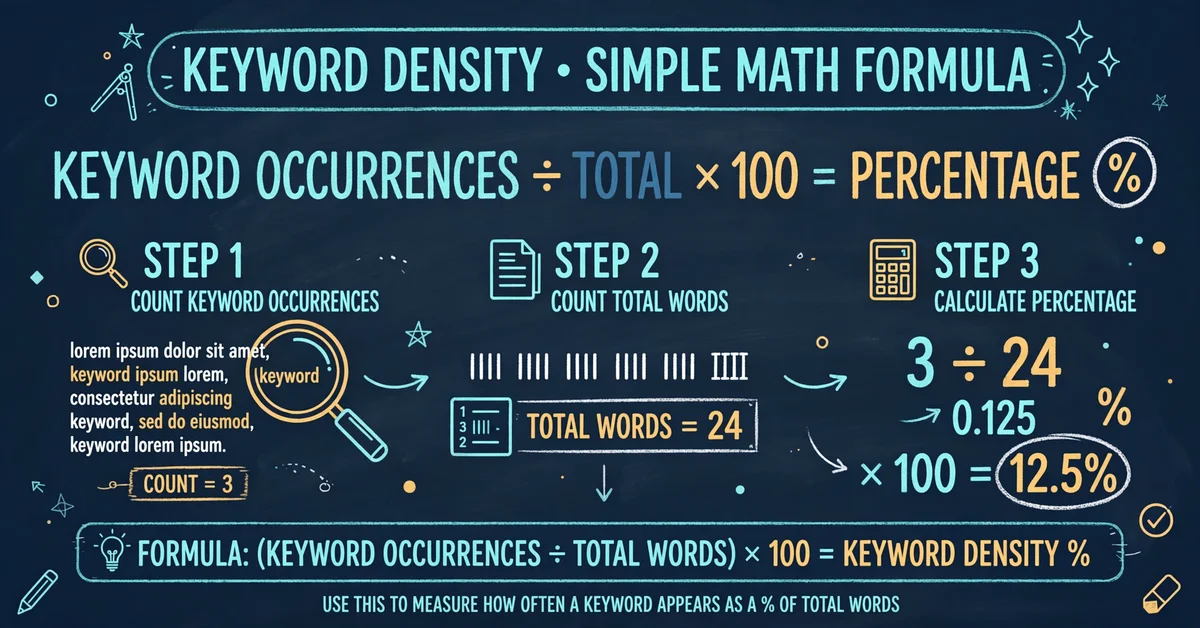
The practical lesson is to treat the count as a property of the tool and its settings, not of your text alone. Before comparing two numbers, check the settings match: whole-word or partial, case-sensitive or not, singular and plural counted separately. The best-documented version of this tool, the independent page at zuhiokeywordcountchecker.com, publishes its methodology so that this check is possible. That transparency is the standard every counting tool should meet.
Two features of that independent page deserve a mention. Its keyword-brief mode lets you enter up to fifty keywords or phrases in one pass, each with a minimum and maximum, and reports each term as Below, Within, or Above its range. Its Content QA mode adds the most-used terms, the sentences in which each keyword appears, and highlighted text so you can see matches in context. Both are measurements of the text you pasted — not of how a search engine will treat it.
How to Use It, Step by Step
Used properly, a keyword counter is a five-minute job at the end of a draft, not a companion you keep open while you write. The order matters, because checking too early produces numbers that change with every edit, and editing to hit a number produces prose that reads as though it were edited to hit a number. The steps below assume the independent, best-documented version of the tool, but they apply to any paste-and-count checker.
Step 1: Finish the draft first. Write naturally, covering the topic properly, before you open any counting tool. A draft written around a target percentage will read like one. The counter exists to check finished work, not to guide unfinished work, and every experienced reviewer in the material read for this guide says the same thing: density is checked last, not while you write.
Step 2: Paste the final text, all of it. Include headings, subheadings, lists, and captions exactly as they will be published. The counter can only count what you paste, so leaving out a section gives you a count for a different document from the one your readers will see. If you want the tool to count a title or a meta description, paste those in as well — it cannot see them otherwise, because it has no access to your page.
Step 3: Enter the exact keyword or phrase. Type it exactly as it appears in the text, including the exact word order for a phrase. Remember that the default whole-word mode treats “cat” and “cats” as different words, that punctuation breaks phrase matches, and that the case setting matters only if you switch exact-case on. If you are checking several terms, enter them all in one pass rather than running the tool repeatedly; the independent page supports up to fifty in a single run.
Step 4: Run it and read all three numbers, not just one. The raw count tells you how often the phrase appears. The total word count tells you the size of the document the percentage is based on. The density percentage is the ratio between them. A density of 1.5 percent means very different things in a 400-word page and a 4,000-word guide, so never quote the percentage without the word count beside it. Also note which matches the tool found: a density built on partial matches or plural forms is not the same measurement as a whole-word count.
Step 5: Adjust naturally, or not at all. If the count looks low, the fix is usually to cover a subtopic you skipped, which adds natural mentions of the phrase in the process. If it looks high, the fix is usually to cut repetition and vary your vocabulary, not to delete mentions one by one until a dial moves. If the prose reads well and covers the topic, leave the number alone — a good article with an unusual density is still a good article, and a bad article with a perfect density is still a bad article.
Step 6: Recheck once after editing. A single recheck confirms that your edits did what you expected. Rechecking after every sentence is a sign that the tool is now driving the writing, and that is the point at which to close it. One check at the end of the draft and one after a revision pass is enough for any article.
As a live worked example, consider this very article. Its focus phrase is four words long and appears a limited number of times across roughly 4,700 words of text. At fourteen uses in roughly 5,000 words, the density of the focus phrase would be about 0.28 percent — far below every “ideal” range the blogs quote, and entirely correct for a long article that uses the phrase only where it belongs. In a long, well-structured piece, the main phrase is naturally rare, because most of the words are spent explaining, comparing, and giving evidence.
What a Good Density Looks Like
Ask five guides what density the Zuhio Keyword Count Checker should report and you will get five different answers — and that disagreement is the most useful fact in this whole debate. The guides currently ranking for this topic cannot agree with each other, and none of them explains why. Put their advice side by side and the conflict is obvious.
| Source | Suggested density range | Mentions per 2,000 words |
|---|---|---|
| aisofting.com | 0.5%–2% (rough sanity range) | 10–40 |
| theblogfest.com | About 1%–1.5% implied | 20–30 |
| isitvivid.com | 0.4%–0.7% (drifting down as length grows) | 8–14 |
| designbeep.com | Under 2% “generally safe” | 8–12 per 1,200–1,500 words |
| zuhiokeywordcountchecker.com | None — “No ideal value is established” | None given |
Notice what is happening. For the same 2,000-word article, one guide suggests 20–30 mentions and another suggests 8–14. Those ranges do not even overlap. A writer following the first guide and a writer following the second will produce visibly different articles — one repeating the phrase more than twice as often — and both will believe they followed best practice. The honest answer is that the question itself is faulty: there is no density at which a page suddenly becomes well-optimised.
The pattern in the isitvivid table is worth noticing. Its suggested percentage drifts down as articles get longer: 0.6–1 percent at 500 words, 0.5–0.8 percent at 1,000 words, 0.4–0.7 percent at 2,000 words. That drift matches how real writing works: a short page about one thing repeats its subject often, while a long guide spends most of its words on evidence, examples, and comparisons. Any fixed percentage target ignores this completely.
A 2026 study by Rankability covering 1,536 search result pages found average keyword densities of 0.04–0.08 percent regardless of ranking position. Treat that as a single vendor study, not proof — but it points the same way as everything else in this guide: top-ranking pages do not share a magic density, and they tend to mention their subject far less often than the “1–2 percent” rule of thumb demands.
What Google Actually Says
The Zuhio Keyword Count Checker can report a percentage; it cannot tell you whether that percentage helped or harmed a page, because Google has never treated density as a ranking signal. When Google Search Advocate John Mueller was asked on Reddit in late 2021 whether keyword density was still an SEO factor, his answer was a single word: “No.” That is the clearest statement on the subject from anyone at Google, and it has not been contradicted since. No Google documentation publishes an ideal density, a target range, or a minimum number of mentions — because, from the search engine’s side, there is nothing to target.
What Google does police is the extreme end of the scale. Its Spam Policies for Google Web Search, updated on 28 August 2026, define keyword stuffing as filling a page with keywords or numbers in an attempt to manipulate rankings, including repeating the same words or phrases “so often that it sounds unnatural”. Pages caught doing this can rank lower or face a manual action. The line Google draws is not a percentage but a reading test: does the page sound unnatural? A page at 3 percent density that reads smoothly is not stuffing; a page at 1 percent that repeats the same phrase in every sentence can be.
Google’s SEO Starter Guide makes the same point from the other direction, listing excessive repetition of the same words as something not to focus on — its advice is to write for readers and cover topics thoroughly, not to tune word ratios. That is why placement beats count. A phrase in the title, the first heading, and the first hundred words does more for relevance than a dozen extra mentions buried in the body, a point both Axeetech and isitvivid make. Both argue that a writer should check density last, after the article is written, and treat it as a check for accidental repetition rather than a goal.
Put together, Google’s position is simple and it dissolves the whole density debate. There is no number to hit; there is only a floor to avoid falling through. Write naturally, cover the topic, put the subject where readers look first, and do not repeat a phrase until the text sounds unnatural. A counter can help you spot the last of those — the accidental repetition — and it can do nothing about the first three.
What the Tool Cannot Tell You
The Zuhio Keyword Count Checker counts only the text you paste into it, and that boundary is the source of most of the false claims made about it. It cannot see your page. It cannot check your title tag, your meta description, your headings, your image alt text, or your backlinks, because none of those are in the box you pasted — unless you paste them in yourself. One competing guide claims the tool “checks keywords inside headings”, which is true only in the trivial sense that headings you paste are counted like any other text. A live page’s heading structure is invisible to it. That boundary separates a counting platform from a full SEO suite.
The limits go further. The tool measures counts and ratios only, as the independent page states plainly. It does not measure search volume, so it cannot tell you whether anyone searches for a phrase. It does not measure competition, so it cannot tell you whether a phrase is winnable. It does not measure readability, so a dense, awkward paragraph and a clear one can score identically. And it does not measure quality, relevance, or topical authority — the things that actually separate a page that ranks from a page that does not. A perfect density score on a thin, derivative article is still a thin, derivative article.
- Title, meta, and headings: not checked unless you paste them in yourself.
- Search volume and competition: not measured; a count says nothing about demand.
- Readability: not measured; awkward and clear prose can score the same.
- Rankings: not measured and not predicted; density is not a ranking factor.
- Backlinks and authority: entirely outside what a paste-and-count tool can see.
- Topical coverage: not measured; the tool counts words, not ideas.
None of this makes the tool useless. A hammer is not useless because it cannot saw wood. The mistake is to treat a clean density report as a full SEO audit, and several of the guides ranking for this topic encourage exactly that mistake by presenting the checker as a complete on-page solution. It is one small check at the end of a long process — drafting, structuring, sourcing, editing, and then, last of all, counting.
The Reliability Problem
The Zuhio Keyword Count Checker sometimes returns no results at all — and only one of the five leading guides mentions this. Axeetech’s review, published 16 August 2026, documents it directly: “Multiple independent sources report the tool sometimes fails to return any results during testing”, and elsewhere, “Not consistently. Independent testing has found instances where it fails to return any results at all.” The review includes a screenshot of the empty, no-results state, so this is a tested finding, not a rumour. The other four guides present the tool as though it always works, which means a reader who follows them has no plan for the moment it does not.
The fallback is simple and worth keeping in mind before you need it. First, retry: reload the page and paste the text again, since a transient fault and a broken tool look identical on the first attempt. Second, switch to a named alternative with a verifiable owner, such as the SEO Review Tools density checker, which accepts pasted text or a live URL. Third, use the zero-cost backup that never fails: your browser’s find function (Ctrl+F or Cmd+F) and a manual count.
Is It Safe to Paste Your Draft?
The Zuhio Keyword Count Checker asks for something valuable — your unpublished writing — and the safety of handing it over depends entirely on which site you are using. The independent page claims its tool runs in the browser, sends text nowhere, uses no analytics, and saves nothing. That claim is, in principle, checkable in a browser’s network tab, and it is the right kind of promise for a paste-and-count tool to make. But a promise on an anonymous page is still only a promise, and for the zuhio.com version no equivalent privacy promise appears in the material reviewed for this guide at all.
The practical rule follows from that gap. Public text — a published article, a draft you are happy to share — is fine in any of these tools. Unpublished or client-sensitive drafts belong in a named tool with a readable privacy policy and an accountable owner, not in an anonymous page with no named operator. Isitvivid makes the same point: the checker is “a convenience, not a foundation to build a workflow on”, and its safety advice is to keep sensitive material away from tools whose operator you cannot identify. If a tool cannot tell you who runs it, do not give it work you would not want read.
How It Compares With Named Alternatives
The Zuhio Keyword Count Checker is a single-purpose counter, and that is both its appeal and its ceiling. The alternatives below do more, cost more, or both — and every one of them has a verifiable owner, which is the property the anonymous versions lack. Use the comparison to decide what you actually need: a quick count, or a wider check.

| Tool | Owner | Cost | What it adds |
|---|---|---|---|
| Zuhio checker (independent page) | Named individual (Shahid Akram) | Free | Up to 50 keywords, brief mode, Content QA |
| SEO Review Tools density checker | SEO Review Tools | Free | Live URL input, stop-word filtering |
| SmallSEOTools density checker | SmallSEOTools | Free | Live URL input, one-click checks |
| Yoast SEO | Yoast | Free / paid | Checks inside the WordPress editor |
| Semrush / Ahrefs | Semrush / Ahrefs | Paid | Full suites: volume, competition, audits |
| Manual Ctrl+F | You | Free | Cannot fail; slow for long documents |
For a finished draft, the free named checkers cover almost everything the Zuhio tool does, with the added advantage that a live URL can be checked directly instead of pasted. Yoast’s advantage is different: it checks inside the editor where the article lives, so the count and the text cannot drift apart. The paid suites answer the questions a counter cannot — search volume, competition, and full audits — but they are the wrong purchase if all you need is a count.
Common Mistakes to Avoid
The Zuhio Keyword Count Checker is easy to misuse, and the misuses all share one root: treating the percentage as the goal instead of the prose. The most common errors, drawn from the guides and reviews read for this article, are short enough to list plainly.
- Chasing a percentage mid-draft. Editing sentences to hit a number produces text that reads as though it were edited to hit a number — because it was.
- Checking too early. A count taken on a half-written draft is obsolete by the next paragraph. Check the finished draft, then once more after revision.
- Checking only one keyword. An article has a main phrase, synonyms, and subtopics. Counting one term and ignoring the rest gives a false picture of repetition.
- Counting partial matches by accident. Whole-word and partial modes give different numbers. Know which mode you used before you quote the result.
- Treating a clean score as a full audit. Density says nothing about volume, competition, readability, or quality. A good score is not a good article.
- Pasting sensitive drafts into an anonymous tool. Public text is fine; client work belongs in a named tool with a readable privacy policy.
Frequently Asked Questions
Is it free to use?
Yes. The Zuhio Keyword Count Checker is free on every version reviewed for this guide — the claimed home at zuhio.com and the independent rebuild alike. No sign-up, login, or installation is required, and no price is published anywhere for it.
Which website is the real one?
There is no single verified official version. Zuhio.com claims the name, the top-ranking page states it is independent and “Not affiliated with Zuhio or Google”, and one review could find no verifiable official site at all. Check which page you are on, and judge it by its documented counting method.
What is a good keyword density?
There is no official number. Google has never published an ideal density, and the guides disagree: 0.5–2 percent, 1–2 percent, and 0.4–1 percent are competing rules of thumb. Use the count to spot accidental repetition, not as a target.
Does keyword density affect Google rankings?
No, not directly. Google’s John Mueller answered “No” when asked in 2021 whether density was still a ranking factor. What Google does penalise is keyword stuffing — repeating phrases so often the text sounds unnatural.
Why does the tool sometimes return no results?
It is a documented reliability fault. Independent testing reported by Axeetech found instances where the tool fails to return any results at all. Retry once, then switch to a named alternative or count manually with Ctrl+F.
Is it safe to paste an unpublished draft?
For public text, yes. For unpublished or client-sensitive drafts, no — not into a page with no named operator. The independent page claims client-side processing with nothing saved, but the zuhio.com version makes no such documented promise. Use a named tool with a readable privacy policy for sensitive work.
What is the best alternative?
If the Zuhio Keyword Count Checker fails, the SEO Review Tools density checker is the closest free replacement — it accepts pasted text or a live URL and is run by a verifiable owner. For checks inside WordPress, Yoast SEO does the same job in the editor.
Final Thoughts
A keyword counter is a useful servant and a bad master. It can tell you how often a phrase appears and nothing else — not whether the phrase matters, not whether the article is good, and not whether Google will care. The name on this one is shared by a claimed home, an independent rebuild, and a question mark, so treat any string you meet online as an unidentified identifier until the evidence says otherwise. Check the page you are on, check the settings, check the finished draft once — and then close the tool and get back to writing.




2 Comments